June 2, 2010

iPad For Education Revisited

IMG_0070.JPGIt's been four weeks and my iPad still has that new computer smell. Now that I've been using it in my workflow I wanted to post some additional comments on it's utility in an educational setting.

In general I think my original take holds up well - this is fantastic tool for consuming content, is extremely useful as an outboard content manager, and passable in a pinch as a creation tool (this whole post was written on it).

On a meta level it is truly amazing how natural the "point and do" nature of the touch interface feels. Once you understand the grammar of the device it all just flows. A mouse now feels clunky for most operations other than image processing or massive spreadsheets.

I don't think I will ever buy another laptop - although I will continue to need a desktop/office machine (for a while).

This post is organized in three sections:

  • Consuming Content
  • Managing Content
  • Creating Content
My experience so far has taught me that the pad has very different capabilities in each category and depending on your use your mileage will vary. While I do not have direct experience with an Android pad based on what I've seen of their phones I think my comments will generalize.


Consuming Content

I've been using computers daily since 1983 and the iPad is hands down the best user experience I've ever had when it comes to content consumption. It isn't any one thing - screen size, portability, battery life, Wi-Fi + 3G always on access, multitouch, and a great line up of apps all contribute. New users will find that the temptation to over-consume content is a phase you need to pass through.

On-Line News (RSS)

My daily "newspaper" is now Early Edition - a nifty RSS reader that presents your feeds in newspaper like headlines for scanning. Tap on the heading and get the full article Best of all - just like a newspaper the feeds refresh every day and then disappear. No more opening up the reader after a week away and seeing 500 articles weighing down your conscience. I also scan the New York Times, BBC, NPR, and Newsy (video).

Books

As a straight text reader it is no better or worse than most of the eReaders I've seen. It doesn't work well in direct sunlight but is fine otherwise (I'm writing this on my shaded porch mid-morning with no problems).

I absolutely love the ability to tap on any word and pop the dictionary open, particularly for older books. I'm currently enjoying Grant's memoirs, no small book.

Some people have complained about the weight, and when you are lying on your back in bed it can get a little wearisome. If you are comparing it to a novel it is heavier, but when you compare it to a textbook (or four) it is featherweight. I bought the Apple case and the ability to prop the device up three different ways makes a big difference.

Games


165c8089f97b380e40416c5628b4b6fbGames are a hoot. Playing iBomber 2 using the accelerometer to angle your flight path just feels right. Fieldrunners is an addicting tower defense game that grew up on the iPhone but is much better in the larger format. Just about any game feels and plays better than on the phone (Mah Jong, Solitaire, Sudoku, etc).


For those of us who have been advocates for game based learning this device opens up a new avenue of exploration. Always on access and location awareness have some particularly interesting applications for augmented reality gaming within a community.

Video

The video wars are real and annoying. As more video goes to HTML5 this is going to wane - but regularly there are blank spaces on my screen where Flash should be. I expect this will be the issue the first competitors latch onto.

But don't be dismayed, there is plenty of video. I just fired up Netflix - being able to watch movies and TV on demand is going to be particularly nice. ABC has an app that streams their content over 3G. YouTube already worked just fine on the iPhone so no worries there.

And video is gorgeous. I'm actually looking forward to my next long flight!

Implications for Education:

Devices like the iPad will change how content is shaped and delivered. Portable true multimedia delivery with the power of databases on the backend is the leap we have been aiming towards for 30 years. That day has arrived.

As a replacement for textbooks this is a lightweight wonder. It should open up a wave of creative innovation for multimedia instructional content with real time formative assessment (via game-like experiences).

I know this sounds like hyperbole - but remember that as a tech veteran I was skeptical and planning on holding out for a generation or two - until I got my mitts on one for 24 hours. So many of the barriers to real multimedia in the classroom and beyond just melt away with devices like these.

Price is going to be the final frontier manufacturers will have to cross - then Katy bar the door. Your old publishing paradigm will not survive.


Managing Content


1037I've been using Things on my Mac to manage action items for myself and my team for a few months now. This friendly GTD manager has improved my effectiveness as a manager by an order of magnitude. The iPad and iPhone versions have allowed me to take it mobile and capture and assign action items on the fly (instead of transcribing them after a meeting).


I'm finding the triumvirate of devices isn't redundant, and having them linked and synced is a huge boost. There are some places I only have my phone, the pad is my choice for meetings, and my Mac is best at my desk.

My only beef at this point is that as with any evolving tech not all features are on all devices. Most notably the ability to assign an item to someone only works on the Mac. It is still infinitely easier to just drag it over their name once I've synced than transcribing it, so it isn't a show stopper. I'm assuming this will be resolved in an upcoming release.

Email works seamlessly - I connect to both IMAP and Exchange servers on my nine email accounts and everything is going smoothly. With the iWork suite installed ($30 for word processing, spreadsheet, and presentations) I have access to almost any attachment.

Integrated calendaring is wonderful - and having it synced with the desktop and phone is just as useful here as it is with my to do lists.

Both email and calendar are great examples of apps that have a high utility on my phone but which benefit from the larger screen of the pad. iPhoto also falls into this camp. As a general rule when you are managing stuff more screen improves usability.

Implications for education

Students have always been challenged to manage information - schedules and homework assignments in particular. Teachers face an even more daunting info management task as they juggle assignments, rosters of students (and their families), state and district standards, and instructional materials.

The iPad will be a real boost for both groups. At a basic level it will make automating and interacting with complex data much easier. Blackboard's demo of their iPad app shows how this can work.

But most importantly I believe it will make it easier to make connections and use information in on-line databases at the teachable moment. With 3G you can dig into your stuff anywhere at the moment of need.


1105829_phone-graphingSure you can do most of this on your phone today - but after three years the scrunched over squinty stare at my phone is wearing thin. The iPad provides much more natural and human scale interaction.


Creating Content


16918_1231173022_mediumThe iPad is an imperfect content creation device, at least without a couple of additional tools. For short bursts of writing, photo editing, and simple drawing is performs admirably. More complex tasks can become a chore.


Admittedly my facility with the interface is still evolving and I've been so bowled over by the consumption and management tools that I have not done a ton of creation yet. My take on this could be quite different in six months.

Don't believe the hype about touch typing on this device - you might be able to make it work but I've reverted to a two finger hunt and peck style. The speed I get with this approach is similar to thumb typing on a Blackberry and is quite acceptable, but it is about half of what I can do with a keyboard.

I have found when taking detailed notes in meetings that an external Bluetooth keyboard is essential. I think this will also make it possible for me to travel without my laptop. For walking around a show floor I'll just need the pad - if I'm back in my room writing a blog post I'll be on the keyboard. (For the record this whole post was written without the keyboard.) No more paper notepad for me.
I think I will probably never buy another laptop. I'll have a full blown system at my desk for big tasks and my mobile tasks will be shared between the iPad and iPhone.

Implications for Education

We will still need computers in schools for content creation. If kids are writing a couple of paragraphs or using a worksheet a pad will suffice. At the primary grades a pad may be all that is needed. As the assignments get more complex students will need access to a variety of devices including full blown computers.

Ironically it is quite possible that pad computing will bring back the computer lab. As kids dash between classes juggling assignments, doing just-in-time research, and taking notes the highly mobile pad will rule. When it comes time to write a 5 page paper, delve into a complex set of scientific data, or draw an image existing platforms will have a role.

Over time this may change. The fate of scientific workstations may hold a cautionary tale for PCs (all flavors). Initially the workstations held their own and even flourished as low cost PCs flooded the market. The specialized hardware, large monitors, and data crunching capabilities had a place and earned a huge premium. But eventually Moore's Law caught up with them as PCs rivaled their specs. Poof they went to a niche of a niche.


In Summary

After a few weeks of steady use I'm convinced that pad computing will change the face of educational publishing.

The most immediate impact will be in instructional materials as publishers scramble to take advantage of the new interface. As a buyer I would move carefully in this environment - there are likely to be a few dead ends as we collectively discover the best uses of the new tech. Find those places where the impact will be the greatest and start there.

A second wave of benefits will come when the SIS and Data Warehouse folks design easy to use interfaces for their systems. Since most of these are web based already this isn't that big a technical leap - but it is a huge user interface challenge.

But the huge payoff will come when students can create and manage their content on these devices. Interactive wiki like textbooks, vast video libraries, and student portfolios should have a new and more usable place in teaching and learning.

That is - when the price comes down. Which it will.

Get ready.

October 21, 2009

The Dark Ugly Truth About Project Management

A picture is worth at least 1,000 words. Thanks to Richard Carey for the link to this gem.
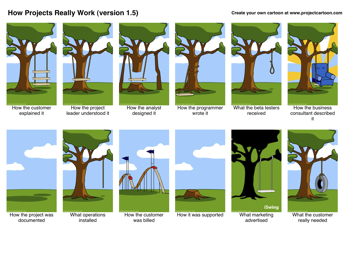

how-projects-work
Nothing like a good dose of dark cynical humor to get your day started!

It's nice to see Richard back in the game from his super secret big project.

Bookmark: Bookmark The%20Dark%20Ugly%20Truth%20About%20Project%20Management at Google.com Bookmark The%20Dark%20Ugly%20Truth%20About%20Project%20Management at del.icio.us Digg The%20Dark%20Ugly%20Truth%20About%20Project%20Management at Digg.com Bookmark The%20Dark%20Ugly%20Truth%20About%20Project%20Management at Spurl.net Bookmark The%20Dark%20Ugly%20Truth%20About%20Project%20Management at Simpy.com Bookmark The%20Dark%20Ugly%20Truth%20About%20Project%20Management at NewsVine Blink this The%20Dark%20Ugly%20Truth%20About%20Project%20Management at blinklist.com Bookmark The%20Dark%20Ugly%20Truth%20About%20Project%20Management at Furl.net Bookmark The%20Dark%20Ugly%20Truth%20About%20Project%20Management at reddit.com Fark The%20Dark%20Ugly%20Truth%20About%20Project%20Management at Fark.com Bookmark The%20Dark%20Ugly%20Truth%20About%20Project%20Management at Yahoo! MyWeb


If you enjoyed this article, subscribe to the RSS feed for regular updates!

September 13, 2009

Wired Nails It On The New Literacy

image001Clive Thompson over at Wired has a great short essay on the modern revival of the written word in the age of social media. He cites work done at Stanford that shows that todays students are writing more than their parents - in fact 38% of their writing is has nothing to do with school. Better yet - they are writing for an audience - or at least an audience wider than a single Professor.

Here are a couple of key quotes (emphasis added):

...young people today write far more than any generation before them. That's because so much socializing takes place online, and it almost always involves text.

It's almost hard to remember how big a paradigm shift this is. Before the Internet came along, most Americans never wrote anything, ever, that wasn't a school assignment.

The fact that students today almost always write for an audience (something virtually no one in my generation did) gives them a different sense of what constitutes good writing. In interviews, they defined good prose as something that had an effect on the world.

I also like the reference to "haiku like concision."

First Hand Experience

Writing to engage an unknown audience is a skill that, until very recently, only a few of us have had to master. My blogging experience has convinced me that this is a good habit of mind to develop. When I have to explain my thinking in an on-line context I'm forced to organize my thoughts into a logical sequence and put some metaphorical polish on them. Its a mental workout.

When I started this blog over 2 years ago I realized that I hadn't written for an audience in decades. Other than a couple of brief forays into campus journalism I'd almost always written for someone I knew on a topic that was an assignment or an internal work project.

When we are sharing a drink at the EdNet reception tonight I'll be able to speak with a bit more authority and ease than I could pre-blogging.

Implications for Publishers

A critical part of engaging and motivating today's learners is incorporating the new literacy tools into teaching and instruction. Just because writing is an assignment doesn't mean the only person who counts is the teacher.

Imagine an assignment where the grade involves engaging others with your writing - provoking a thoughtful response to your ideas. Wouldn't this be far more interesting than regurgitating the facts? Wouldn't it be more authentic? Wouldn't the engagement provide a wider view for the instructor to gauge the work of the student?

Here are a few questions to stir the pot as you look at your own materials.

  • What are you doing in your products to encourage writing that is visible beyond the classroom?
  • Are you engaged in social media yourself - learning first hand the new craft of writing?
  • Have you created an on-line space where students can share their ideas?
  • Do you reference tools and resources that allow students to blog, wiki, tweet, and plurk?
  • What are you doing to help teachers make this transition?
September 11, 2009

EdNet Survival Guide - 6 Tips

image020EdNet 2009 starts this Sunday in Chicago. This is one of the three most important events of the year* for networking and professional development in the education industry. I've been attending since the early 90's with only a couple of absences.

Nelson Heller, EdNet's founder, has also been a friend and mentor - as he has so graciously been to many of us across the industry. This year the conference is under MDR's aegis - and it will be the same top-notch opportunity to expand your consciousness it has always been

Why is this event important? In a nutshell it is all about conversational efficiency. You can talk to more people about partnerships, recruiting, selling, or just "gettin ta know ya" in a few hours at EdNet than you could in two months on the road.

Making The Most Of EdNet

Here a few tips I've learned over the past 18 years that might help.

1. Ignore the sessions. The most important work at EdNet happens in the lobby, bar, and coffee shops around the hotel. If your goal is to have conversations with a lot of folks you can't very well do that when you are sitting in a session.

2. Attend the sessions. That said - there are some wonderful opportunities to polish your knowledge base and see the industry in new ways in the sessions. Take the time to scan the schedule and star the ones you want to try and attend.

3. Be clear about your goals. If you show up without a clear idea of the kinds of conversations you want to have there are endless opportunities to engage in meaningless banter. This doesn't have to take long - hell you can even do it on the inbound flight. You also don't have to have specific people or companies in mind, just let folks know what you are after and opportunities will find you.

4. Learn to gracefully exit non-productive events. At some point you will find yourself in a meeting or session that adds no value to your goals. Find ways of exiting these as kindly as you can. You never know when you will want to engage with the folks you are disentangling yourself from - so don't be rude. But don't let them waste your precious time.

5. Leave time for serendipity. Some of the best meetings I've had at EdNet happened off the cuff. Don't over-schedule yourself.

6. Your ears are more important than your mouth. There are many people at EdNet in "pitch" mode - looking for anyone who will listen to their story. I've found that an enormous amount of market intelligence is available for free - but you have to ask good questions and listen hard to the answers. Leave the pitch at home.

I hope to see you in Chicago in a couple of days - travel safe!

* The other two are the AEP Summit and SIIA conferences.

Bookmark: Bookmark EdNet%20Survival%20Guide%20-%206%20Tips at Google.com Bookmark EdNet%20Survival%20Guide%20-%206%20Tips at del.icio.us Digg EdNet%20Survival%20Guide%20-%206%20Tips at Digg.com Bookmark EdNet%20Survival%20Guide%20-%206%20Tips at Spurl.net Bookmark EdNet%20Survival%20Guide%20-%206%20Tips at Simpy.com Bookmark EdNet%20Survival%20Guide%20-%206%20Tips at NewsVine Blink this EdNet%20Survival%20Guide%20-%206%20Tips at blinklist.com Bookmark EdNet%20Survival%20Guide%20-%206%20Tips at Furl.net Bookmark EdNet%20Survival%20Guide%20-%206%20Tips at reddit.com Fark EdNet%20Survival%20Guide%20-%206%20Tips at Fark.com Bookmark EdNet%20Survival%20Guide%20-%206%20Tips at Yahoo! MyWeb


If you enjoyed this article, subscribe to the RSS feed for regular updates!

May 5, 2009

Twitter Peeves 'n Raves - #1

1059We are collectively discovering the value of social media tools like Twitter. As we do this we wander blind alleys and make surprising discoveries. Forthwith a peeve and a rave about micro-blogging.

Peeve - People who tweet that they are about to do something. So what? How about you tweet after you have done it and have something interesting to say. "I'm off to the mall" Fascinating - yawn.

Rave - Genuine kudos handed out freely. Yesterday a friend (@perludus) had to return a pair of shoes. He tweeted "Three cheers for @Footwise! Returned my shoes that wore through the sole in 2 months w/no questions asked!" Positive energy put into the system always comes back to you. It also makes others feel positive about the world. All that in 140 characters - cool.

Bonus Round

Peeve - Overposting. I now routinely check the tweet thread of people I might follow to see how frequently they post. Any more than a couple of times a day and forget it. Sorry - no one is that interesting. (An occasional burst when you are live tweeting an event is fine.)

Rave - Breaking News (@breakingnews). Get headlines long before they show up on mainstream web news sites.

Productivity Tip - Treat twitter like a room with friends in it. When you are busy elsewhere you don't hear the conversation and that is just fine. When you can drop by you get to hear what is going on and chime in. If you try to experience it like email where you have to see every tweet you will develop the twitter twitch (twittcher?).

December 30, 2008

Twitter Basics

twitter_logo
Are you Twitter curious? For the past few months I've been on the fence about Twitter - lurking but minimally engaged. Like all new technologies as people play with it they are discovering what it is best for. Recently I've watched as my friend Charlene Blohm has begun leveraging it to help drive her business.

Twitter seems to be following a similar path to other new technologies. The enthusiasm of early adopters misrepresents what the technology is really capable of. Think LaserWriters/Postcript and flyers with 23 different fonts on them (circa 1986) or web pages cluttered with frames (circa 1998). Once the dust settled and a "grammar" of usage emerged we all benefited. But every new technology has to pass through a stage of wild and random experimentation to get there.

Twitter is passing out of this stage right now so it is a good time for the rest of us to engage with it.

I was picking Charlene's brain yesterday about Twitter commands and resources (the company's web support sucks) and she gave me this list of articles and resources that can help you get started.

Getting Started With Twitter (by a teacher)
Twitter Tools for Community and Communications Professionals
List of Twitter Commands
How to Use Hastags [to track topics and events]

Coming Attractions

In the next couple of weeks I'll do a post on What Twitter Does Well and another on How to Abuse Twitter. In the meantime you can start following me by tracking Embir.

Other Education Publishing related twitterers that I know if (there are 10's of thousands out there).

Charlene Blohm & Associates
Nettrekker / Thinkronize
Gary Stager
Cool Cat Teacher
TechnoLibrary - Carolyn Foote
360Kid - Scott Traylor
Terry Anderson
Richard Carey
Liz Strauss
Education Week
School Library Journal
PBS Learning Now

Please add others in comments. If you are new to Twitter - welcome to the conversation.

August 19, 2008

Database Fluency - Core Skill for the 21st Century

490819_ipod_videoInformation is expanding exponentially. Applying database concepts to your information diet can mean the difference between overload and sanity, chaos and productivity. Database fluency is mandatory in a digital world. Students and teachers should be practicing and refining this skill so that today's learners can make the most of the sea of data they swim in.

Almost anything you encounter in digital format can be managed using database techniques. At their root Facebook (relationships), iTunes (music, movies, tv, books, etc.), del.icio.us (bookmarks), flickr (photos), Moodle (lesson plans, learning management), and We Are Teachers (referrals) share a common database DNA. Even blogs through their categories and tag clouds are databases.

Email is an example. Treat the sender's address as a data point. Then set up rules (database queries) to have all your boss's emails sent to a high priority folder and Aunt Mabel's political ravings sent straight to the trash. This approach allows you to target the urgent items amidst a sea of dross.

The Education Need

Educators and educational publishers have a vital role to play in our move to a database driven world. Why?

  • Students need to develop database fluency if they are going to get the most out of their digital lives. Learning Management Systems (LMS), social networks, and on-line research are all core tools for 21st Century education. Database fluency should become part of the curriculum along with textual, numerical, and visual fluencies.
  • Teachers need access to networks of peers, experts, and content to be able to deliver on the promise of individualized instruction.
  • Administrators and Policy Makers need to measure results across groups and efficiently allocate resources.
Every one of these needs is best met by a database and fluent users.

The Goal

The end result should be personal growth, valued relationships, and effective organizations. But in the first flush of widespread adoption we are losing sight of this. Consider the statement "I "friended" 1,000 people on Facebook therefor I have 1,000 friends." Wrong. Many people are confusing the database with their relationships.

A teacher could take the Facebook example above and build an interesting set of discussions around the meaning of friendship, how to find a small network of people who are interested in the same things you are, what you can do to contribute, and how to manage the relationships that emerge. It isn't creating huge numbers of meaningless connections that matters - it is finding the needles in the haystack of humanity that you want to build bonds of friendship with.

Database Fluency

What is database fluency - what are the core skills proficient users need to master?

  • Ubiquity - See every digital file you touch as a potential data point. Emails, MP3 files, Word documents, student records, and your photos are all potential data points.
  • Searching - Understanding how to craft logical questions that return useful information takes ongoing practice ("and", "or", "greater than", "before", etc.). Learning to to harness the advanced search features almost all applications have is another part of this skill.
  • Homing - The ability to find what is meaningful and valuable in large data sets by asking the right questions at the right time. Is this a reliable source? How recent is the data? Does this address the question I set out to answer? Is it usable or a tangled mess? How does it compare with other results?
  • Tagging - Users tag data elements to personalize them. This can be through formal taxonomies provided by the database author ("Male, Female") or informal folksonomies created on the fly by users (flickr tag clouds). Since tagging is so open-ended having some basic rules in place can help insure you are able to use the tag cloud later to search the data.
  • Cleaning - Any collection of data gets messy after a while - knowing how to clean your data just like you clean your room is an essential part of working with large data sets. Without maintenance your searching and tagging get bogged down.
  • Reporting - Creating clear usable reports that make the point you are after is an important part of turning data into information and eventually into wisdom. When is a table better than a bar chart? Should I focus on 5 or 500 names?
None of this involves database programming. That is a skill more akin to auto mechanics - I don't need to know how to tune my engine to drive a car. I also don't need to know SQL to use a social networking site. However, for driving and networking I do need to know the rules of the road and how navigate where I want to go.

How these elements appear in different applications varies widely - understanding the underlying dynamics helps harness their power across many environments.

RSS readers click through to see the full article - 3 detailed examples that bring these concepts to life and some suggestions on where to start.

Continue reading "Database Fluency - Core Skill for the 21st Century" »

August 11, 2008

More Shelves or Less Stuff?

Overloaded carSchools are inundated with paper and instructional materials at this time of year. Those of us who build education products and create marketing collateral should be cognizant of is how wasteful so much of this is.

In our personal lives many of us go through the "more shelves or less stuff" debate all the time, and all too often we end up at Ikea with another Sbrorg shelving unit strapped to the top of the car.

Please stop.

If you think you need to ship that much crap into schools to compete you need to look at your business model. They don't want it, don't need it, and won't use it. Somewhere someone in your organization has not made some choices about what to create. They punted and tossed it all in.

I recently had lunch in a restaurant that bragged that virtually everything they used was recycled or composted. The only things that go into the trash are coffee cup lids, salad dressing packets, and tea bags (metal staples). This is a fast food BURGER joint. Their prices were in line and as a consumer I appreciated that they had put that much thought into their processes. I'll be back - and not just because the burgers were great.

The thought and care you add to your products will come back to you, but sometimes it means taking a little more time to think things through and a couple of hard decisions about what is truly essential in your products/materials. You will have to push hard and hold firm for this to happen - the pressure and temptation to put more in will always be there.

"I did not have time to write you a short letter so I wrote you a long one instead." Mark Twain
Resolve to cut 20% out of all your marketing materials and something amazing will happen. You will save money and your message will be crisper.

In the end less stuff is the only sane way forward.

May 9, 2008

Teaching Time Management - Do you walk the walk?

1037Information overload is one of the defining trends of the last 10 years. The explosion of email, social media, and cellular technologies have created 24/7 leashes that drown us in information.

As publishers (and citizens) we have a responsibility to help today's kids build good information habits in this new world.

I've written elsewhere about how our old behavior patterns make this worse than it needs to be. The question for today is - are you managing your information diet or is the information managing you?

When you sit down to your Cheerios tomorrow morning will you read the paper or will you read a book? In the paper you HOPE to learn something - anything really. If you have picked out a book you INTEND to learn something - something specific you can use.

It is the same 30 minutes a day but at the end of a month the newspaper reader will have garnered some gossip and a few insights along with recycled conventional wisdom on the editorial pages. The book reader will have challenged their thinking in some very specific ways that will help them grow, learn, and help others.

There is a place for randomness in your information diet - but with so much information at our fingertips today this can be a much smaller portion of our information diet than it used to be.

This is one small example of what the "low information diet" looks like. For those of us in the education publishing world we really have to start thinking about how we build these new skills into our products. This is doubly hard for us because most of us are built our habits in the old paradigm.

Try not reading the newspaper for the next two weeks and substituting something you have been wanting to learn but putting off. Check in with yourself at the end of the experiment and see how it went.

PS - Go ahead - read the funnies and do the crossword.

Bookmark: Bookmark Teaching%20Time%20Management%20-%20Do%20you%20walk%20the%20walk%3F at Google.com Bookmark Teaching%20Time%20Management%20-%20Do%20you%20walk%20the%20walk%3F at del.icio.us Digg Teaching%20Time%20Management%20-%20Do%20you%20walk%20the%20walk%3F at Digg.com Bookmark Teaching%20Time%20Management%20-%20Do%20you%20walk%20the%20walk%3F at Spurl.net Bookmark Teaching%20Time%20Management%20-%20Do%20you%20walk%20the%20walk%3F at Simpy.com Bookmark Teaching%20Time%20Management%20-%20Do%20you%20walk%20the%20walk%3F at NewsVine Blink this Teaching%20Time%20Management%20-%20Do%20you%20walk%20the%20walk%3F at blinklist.com Bookmark Teaching%20Time%20Management%20-%20Do%20you%20walk%20the%20walk%3F at Furl.net Bookmark Teaching%20Time%20Management%20-%20Do%20you%20walk%20the%20walk%3F at reddit.com Fark Teaching%20Time%20Management%20-%20Do%20you%20walk%20the%20walk%3F at Fark.com Bookmark Teaching%20Time%20Management%20-%20Do%20you%20walk%20the%20walk%3F at Yahoo! MyWeb


If you enjoyed this article, subscribe to the RSS feed for regular updates!

May 6, 2008

A Year In Blogging - 10 Lessons Learned

DSC00106.JPGBlog years and dog years have a lot in common. They go fast, take constant care and feeding, and bring companionship and warmth into your life. Dogs force you to get up and move your body, blogs force you to get out and work your mind.

Social media are reshaping the business landscape and I've never found a better way of learning something than just wading in and messing with it. Under the tutelage of my blogfather Richard Carey and the folks at Justia I launched this site last May.

So what have I learned?

1. It works. 11,528 people interacting with my ideas has helped my business immensely (see stats below). As Jim Bower over at Numdeon is fond of saying - "it isn't about eyeballs, it is about eyeballs connected to brains." Half of my clients come from web referrals and the trend-line is up. It is far better than advertising and its "free." At April's rate there will be 24,000+ visits in the coming year.

2. Writing for a public sharpens your thinking in all contexts. Personally this has been the most rewarding part of blogging. It has forced me to organize and articulate my thoughts on key issues that affect our industry. It is far different than internal corporate writing, blog articles stand or fall on their own merits.

3. Focus = Traction. To succeed a blog has to have a clearly defined audience. I always try to bring my posts back to what the topic means for the companies that serve the education market. If you search on "education business consultant" or "K12 education marketing consultant" this blog is #1 or #2 in Google. That happens because Google rewards sustained focus and original content.

4. Networking is part of the job. Blogging is all about a conversation - know who your peers are and engage with them. Read about related industries and bring the insight back to ours. I use my blog roundups to share things other bloggers are saying that I think are relevant. Some of the most popular posts on the site also came from guest bloggers (thanks Randy, NT, and Paul).

5. Mix up depth and breadth to keep it interesting. People like the depth a 4-5 part series can bring to a topic, but for everyday browsing they also like short pieces that engage their interest.

6. Make it personal. This medium is all about being genuine. Speak your mind, share your story, and be real. Every few months I post what I'm listening to on my iPod - and I get a lot of positive feedback about it even though it isn't on topic. I also enjoy putting in human interest pieces and humor - but that is also part of my personality.

7. Key words matter - a lot. Learning to write blog posts is an art - and doing it well without it looking artificially structured to parse in a search engine isn't always easy. Knowing what words to use and where to use them in your articles is a skill you need to master.

458100666_62cee54e9f_o8. Links and visual cues bring a post alive. Having quality links to support your arguments (or provide alternative viewpoints) adds credibility. Picking a graphic that amplifies the message also helps a lot. There are tons of free or near free images out there today so you have no excuse.

9. Good tools make it easier. I use Ecto to draft posts - it allows me to work off-line and is seamlessly integrated with iPhoto and Amazon. Movable Type isn't as user friendly as I'd like it to be - Ecto makes up for that and then some.

10. Patience. Gaining traction takes time - there is no short cut around this. It takes about 20 posts before the search engines take you seriously - with the 10's of thousands of new blogs started every day this is just common sense. But even after you have build a corpus of posts it takes time for people to discover you and become regulars. Don't be discouraged early on.

My thanks go out to those who helped me get started on this path and to the many readers who have provided feedback and encouragement as this adventure has unfolded.

The most popular posts from the last year:

1. Education Publishing - A Wave of Change Sweeps Over the Industry (multi part series)
2. Information Overload (how to build materials for the 21st century - multi-part series)
3. Teachers and the Internet - Five Things You Should Know
4. Lifelong Learning - Retired Construction Worker Deciphers Stonehenge Construction
5. Where is the Wii for Education?
6. Textbooks vs. Education Technology - Clash of Paradigms
7. Target Market Selection
8. The Future of Education Publishing - Panel Report from the Education Industry Investment Forum
9. Ethics Video Game - Using Frankenstein to Teach Ethics?
10. Are We Producing New Education Entrepreneurs


Some stats from the last year.

11,528 visits - This does not include RSS. Not having Feedburner set up from the get go was a mistake. We are putting it in place now.

19,740 page views. This might seem low, but since the landing page is the blog this makes sense. Most people go there, read the latest posts, and move on. Again - without Feedburner this the low end.

1:38 minutes is the average time on the site. This means 314 hours of people interacting with my ideas (or 40 eight hour days). This is a highly leveraged use of my time. Consider these alternatives

  • At 7 minutes prep and talk time per call (assuming you got through on the first call) this would take 168 eight hour days.
  • To get this kind of engagement via direct mail with a 1.5% response rate it would take 768,000 mail pieces.
  • To reach this number of people by speaking at conferences with an average room count of 100 it would take 115 presentations.
  • You get the idea.
  • Actual time on task - 2-3 hours a week (or 16 eight hour days a year).
122 countries. 71% are from the US. Others in the top 10 are Canada, UK, India, Australia, Singapore, Philippines, Malaysia, Germany, and China. I love going into the mapview in Google Analytics to see where people have come from. It took me forever to hit all 50 states - Montana and Delaware were the hold outs! Globally Tibet, Cambodia, the Stans, Syria, Central Africa, Greenland, Guyana, and Uruguay are still terra incognita for this blog.

95% of readers were on a high speed connection. I no longer worry about putting video and other high bandwidth links in my posts. I'm toying with doing some v-casts as well.

79% of users were on Windows, 20% on Macs 1 % on Linux. 7 People came in on a phone and 1 came from a Playstation (WTF?). Why the oversampling of Macs? It probably has something to do with Education being the target market.

5% of users were on 800x600 screens. It looks like we could have comfortably designed for a minimum of 1024x768 and hit 95% of the users.

Bookmark: Bookmark A%20Year%20In%20Blogging%20-%2010%20Lessons%20Learned at Google.com Bookmark A%20Year%20In%20Blogging%20-%2010%20Lessons%20Learned at del.icio.us Digg A%20Year%20In%20Blogging%20-%2010%20Lessons%20Learned at Digg.com Bookmark A%20Year%20In%20Blogging%20-%2010%20Lessons%20Learned at Spurl.net Bookmark A%20Year%20In%20Blogging%20-%2010%20Lessons%20Learned at Simpy.com Bookmark A%20Year%20In%20Blogging%20-%2010%20Lessons%20Learned at NewsVine Blink this A%20Year%20In%20Blogging%20-%2010%20Lessons%20Learned at blinklist.com Bookmark A%20Year%20In%20Blogging%20-%2010%20Lessons%20Learned at Furl.net Bookmark A%20Year%20In%20Blogging%20-%2010%20Lessons%20Learned at reddit.com Fark A%20Year%20In%20Blogging%20-%2010%20Lessons%20Learned at Fark.com Bookmark A%20Year%20In%20Blogging%20-%2010%20Lessons%20Learned at Yahoo! MyWeb


If you enjoyed this article, subscribe to the RSS feed for regular updates!

November 10, 2007

Information Overload - A Cultural Challenge - Closing Thoughts & Resources

Information Overload is a serious problem in our culture today. People are frustrated and overwhelmed by the fire hose of information they are trying to absorb. But, as the American Philosopher Ann Landers was fond of saying:

"No one can take advantage of you without your permission."

In summary:

618617_firemen_hose_practice

  • Personally we need to take control of our information diet. We need to discard our old paradigms and seek information only when we need it.
  • As publishers we need to create products that equip students to be effective in the conversation economy.
  • Professionally we need our customer's permission to have a long-term conversation with them.

I've pulled together some resources that you can tap if you are interested in learning more about this topic.

Blogs

43 Folders - Great site for productivity - a fan of David Allen's work.

Unclutterer - Great daily tips on how to unclutter your life. We can all use this one.

Seth Godin - Marketing maven and a great blog with short punchy articles. It never takes more than a minute to read.

David Armano - An incredibly crisp and visual thinker on marketing. He coined the phrase "conversation economy."

Tim Ferriss - Author of The 4 Hour Workweek - tips, downloads, and worksheets.

Pick The Brain - Ideas for how to be more effective. Another David Allen acolyte.

Marc Andreeson - Wit and wisdom from the founder of Netscape.

Steve Pavlina - Personal Productivity guru. He has some odd ideas but they are worth reading even if it only stretches your thinking.

Books


"Getting Things Done: The Art of Stress-Free Productivity" (David Allen)


"The 4-Hour Workweek: Escape 9-5, Live Anywhere, and Join the New Rich" (Timothy Ferriss)


"Power Sleep : The Revolutionary Program That Prepares Your Mind for Peak Performance" (James B. Maas, David J. Axelrod)


"The Long Tail: Why the Future of Business is Selling Less of More" (Chris Anderson)


"Wikinomics: How Mass Collaboration Changes Everything" (Don Tapscott, Anthony D. Williams)

This was an interesting series of articles to write and it represents a summary of what I've learned over the past couple of years. I hope that you got some insights to help you personally as well as some ideas that you can use professionally.

Information Overload Series

Part 1 - It’s all in your head - really
Part 2 - A cure for “a poverty of attention”
Part 3 - 10 Ways to Build Instructional Products For 21st Century Skills
Part 4 - 10 Ideas to For Marketing & Selling In An Age of Infinite Input
Summary - Closing Thoughts and Resources

October 31, 2007

10 Ways to Build Instructional Materials For 21st Century Skills - Information Overload Part 3

How should we design textbooks and education technology for a world where information is no longer scarce or hard to find? It is time to rethink how we build education products based on new paradigms of information management.

In Part 1 of this series we explored the broken paradigms about information that are driving most of batty. In Part 2 we explored strategies for adopting a new information paradigm to help us survive and thrive in the new climate.

956183540_18bff94222_m.jpgToday we take a look at ten ideas for how we can build products that tap into the new zeitgeist. These are nuts and bolts tactics publishers can use to rethink product development.

In what follows I assume you have read the two prior installments. If you have not you may want to spend a couple of minutes on them first. In a nutshell we need to move from scanning and hoarding “scarce” information to treating it as an infinite resource that can be accessed as it is needed. Just-in-time instruction is no longer for adult learners only.

10 Ideas to Try

1. Start with a call to action. Traditional textbooks are set up backwards for today’s learners. Rather than tacking some practice problems on at the end of the chapter start with an activity that will motivate learners to seek out answers. This is how they work in the rest of their lives and we should mirror and model it in teaching. Projects, thought experiments, team challenges, and research activities are all examples of experiences that promote information seeking. These can be classroom discussions, paper-based activities, or on-line challenges (virtual worlds, games etc.).

405033_synergy.jpg 2. Network your learners - Often we treat collaboration as cheating - but in a world of Facebook and Twitter we have no choice but to harness it. Encourage people working on the same problem to find each other through virtual study groups, student written FAQs, and peer-tutoring. Imagine a system that could help students working on the same problem all over the world find each other on any given evening. There is a precedent for this in on-line games where players can join a queue of people who are looking for others working on the same challenge. Another feature from the on-line game world that you might consider incorporating are guilds - formal associations of players who assist and help each other out. These strategies apply for teachers too!

3. Design instructional approaches that are open - Publishers have worked under the conceit that their materials were self-contained systems. You can’t build self-contained products anymore so don’t even try. Assume that teachers and learners are going to use your materials as a small part of a much larger set of resources.

4. Build for Dynamic Content - It is more important that you provide a framework for asking questions than the definitive set of facts. We can and should provide a core set of facts, but anticipate that new information will be available before the paper is dry on a new book and make a place for it in your on-line presence.

images.jpg5. Build RSS into your products - Proactively deliver a steady stream of new content to users. For example, recent data on global warming shows that most of the projections were flat out wrong - they were far too conservative. Structure RSS streams for students, parents, and teachers. Will Richardson at Weblogg-Ed has some interesting ideas on this topic.

6. Adopt a software business model of continuous improvement. I’ve written elsewhere about the difference between book publishing and software development. This is clearly one area where you will want to build a business model (pricing, editorial resources) that assumes you will be improving a product long after it is “published.”

7. Encourage advanced on-line search techniques. This is one of the most important skills we can give students - and many of our teachers are not equipped to coach students in this area. There is an opportunity for publishers to provide the scaffolding for this skill. Tap into the advanced features of Google search or if you want a safe walled garden use NetTrekker. Hire a Librarian to show you how to do this.

748824_egg_painting_2.jpg8. Plant virtual easter eggs. Seed the web with relevant actionable content (web sites, wikis, and blogs) that good searches will find. Don’t rely completely on serendipity when kids are searching for content. Learn to use Search Engine Optimization (SEO) so your content floats to the top.

9. Build a two way street - Expect kids to find other relevant materials in their searches. Teacher materials should support incorporating outside information. Allow students and teachers to send you resources that they create or find as they work with your materials. Reward and recognize them for this - make it a competition and you will harness the power of user generated content.

10. Don’t be part of the problem. Filter what is included in everything you do to make sure it is relevant, important, and actionable. Strictly limit the outbound amount of content you generate - don’t overwhelm your audience with spammed content. Be a good information provider in a world of overwhelming information flow. Less is more.

Next Steps

Some of this may look a little weird - it runs against long established paradigms. But these ideas are just the tip of the proverbial iceberg. I challenge publishers to take one product suite and try all of these ideas with it. Don’t change your whole catalog, but when you do try it don’t use half-measures. Give it your all. And if you would like some help putting these ideas into your context give me a call.

Next in this series we look at how information overload is changing how we should be selling and marketing products.

In comments let us all know about products that are already employing these ideas, suggest other strategies that we could try, or just tell me where I’m wrong.

Information Overload Series

Part 1 - It’s all in your head - really
Part 2 - A cure for “a poverty of attention”
Part 3 - 10 Ways to Build Instructional Products For 21st Century Skills
Part 4 - 10 Ideas to For Marketing & Selling In An Age of Infinite Input
Summary - Closing Thoughts and Resources

October 29, 2007

Information Overload - Part 2 - A cure for “a poverty of attention”

“Time without attention is worthless, so value attention over time.” Tim Ferris

873928_junk_mail_2.jpgIn Part 1 I talked about how our old paradigm of consuming information is at the root of our information overload problems. Today I present some practical ideas you can use to experiment with changing your paradigm.

I suggest starting with your personal experience with the new paradigm because until you have tried it and seen the results for yourself it will be difficult for you to think about how it applies to building products and services for your customers.

As I’ve written earlier I think the foundation survival skill in the age of infinite input is HOMING. This is the ability to search efficiently and have a nose for what is meaningful in what you find during that search.

What we need to do is couple homing with what Tim Ferris in his book The 4-Hour Workweek calls “a low information diet.”

“Ignorance may be bliss, but it is also practical. It is imperative that you learn to ignore or redirect all information and interruptions that are irrelevant, unimportant, or unactionable. Most are all three.

The first step is to develop and maintain a low-information diet. Just as modern man consumes both too many calories and calories of no nutritional value, information workers eat data both in excess and from the wrong sources.” p 83

Change your paradigm and you can change your behavior and go a long way towards solving the problem.

Now Go Try It

What does this look like? Here are some suggestions if you want to develop the habit of mind of seeking out information when it is actionable rather than endlessly scanning and hoarding.

Some of these ideas are going to look pretty weird because your paradigm has been constructed around the old paradigm. Try them for a week or two and see what the consequences are. Does anything happen where you can't get information you need? Do you have more time for your family or other interests? Does your stress level come down?

Learn to use the advanced search features of Google (or the search engine of your choice). Knowing how to make a haystack into a molehill is the best way to free yourself. It will build the confidence that you can find what you need exactly when you need it. Without this confidence you will never be comfortable dropping scanning and hoarding.

{Update} Build your network. Access to experts when you need them is another part of the puzzle. Call your friends, email old colleagues, attend industry events. Also, invest a little time in LinkedIn and Facebook and see which works best for you. I use LinkedIn for professional connections and Facebook for personal.

801108_crossword.jpgStop reading the newspaper. Or just read one with an emphasis on sports, comics, and puzzles. This may seem extreme but most of the information in the paper is “ irrelevant, unimportant, or unactionable” as Ferris noted. Don’t convert this to going to the New York Times website or CNN either - you want to stop the news habit altogether because you are going to be in the business of making your own news.

Cancel half your magazines - then all of them. Almost all magazines have on-line versions that are easier to access, have live links to deeper information if you are interested, and are easily found with a quick search when the topic will make a difference in your day.

Look at your files and toss 50% of them. Keep the financial stuff you need - everything else can go to recycling. The same goes for your hard drive. Then be ruthless about what you do file - only keep the stuff that isn’t time sensitive or easily found on-line. David Allen’s book “Getting Things Done” is an enormous help with this.

Learn how to use rules to automatically sort your email.
Keep it simple, but do things to pull clutter from your inbox. This allows you to quickly focus on what is important. See one example of what you can do in the next idea.

Automatically file email newsletters in a separate folder. Most of these are just BACN (spam you want to receive). So either unsubscribe or create a mail rule that puts them all into a folder you can scan once a week or month. If you get more than a month behind - just toss it all. Odds are the information in them is available on the organization’s website and easily found if you need it. You would be amazed at how this simple change cleans up your inbox.

Check your email once or twice a day - and never first thing in the morning. As I’ve written elsewhere email overload is mostly a behavioral problem not a technical one. Very few people have jobs where they have to be available for consultation every minute of the day. We do it because it feels productive but it isn’t. Get a couple of critical tasks done before you allow yourself to be interrupted.

Only surf the web during work hours for directly relevant information. No cul-de-sacs of “oh this looks interesting” or mindless link chains. There is a place for curiously seeking out new sites, ideas and information, but it usually isn’t during work hours.

Severely limit your use of RSS. RSS is really automated scanning - and automating an inefficient process just makes it more inefficient. I suggest restricting your feeds to 10 or fewer - try for 5-7. Focus your blog reading on analysis and insight not on news.

I’m sure you can come up with ideas of your own as well - try them. Also be sure to visit Ferris’ site for more ideas and testimonials from people who have tried this.

I leave you with this quote which was cited in Ferris’ book:

“What information consumes is rather obvious: it consumes the attention of its recipients. Hence, a wealth of information creates a poverty of attention and a need to allocate that attention efficiently among the overabundance of information sources that might consume it” Herbert Simon Nobel Laureate in Economics

Next in the series - what does information overload mean for instructional materials?

Information Overload Series

Part 1 - It’s all in your head - really
Part 2 - A cure for “a poverty of attention”
Part 3 - 10 Ways to Build Instructional Products For 21st Century Skills
Part 4 - 10 Ideas to For Marketing & Selling In An Age of Infinite Input
Summary - Closing Thoughts and Resources

>
Bookmark: Bookmark Information%20Overload%20-%20Part%202%20%20-%20A%20cure%20for%20%E2%80%9Ca%20poverty%20of%20attention%E2%80%9D at Google.com Bookmark Information%20Overload%20-%20Part%202%20%20-%20A%20cure%20for%20%E2%80%9Ca%20poverty%20of%20attention%E2%80%9D at del.icio.us Digg Information%20Overload%20-%20Part%202%20%20-%20A%20cure%20for%20%E2%80%9Ca%20poverty%20of%20attention%E2%80%9D at Digg.com Bookmark Information%20Overload%20-%20Part%202%20%20-%20A%20cure%20for%20%E2%80%9Ca%20poverty%20of%20attention%E2%80%9D at Spurl.net Bookmark Information%20Overload%20-%20Part%202%20%20-%20A%20cure%20for%20%E2%80%9Ca%20poverty%20of%20attention%E2%80%9D at Simpy.com Bookmark Information%20Overload%20-%20Part%202%20%20-%20A%20cure%20for%20%E2%80%9Ca%20poverty%20of%20attention%E2%80%9D at NewsVine Blink this Information%20Overload%20-%20Part%202%20%20-%20A%20cure%20for%20%E2%80%9Ca%20poverty%20of%20attention%E2%80%9D at blinklist.com Bookmark Information%20Overload%20-%20Part%202%20%20-%20A%20cure%20for%20%E2%80%9Ca%20poverty%20of%20attention%E2%80%9D at Furl.net Bookmark Information%20Overload%20-%20Part%202%20%20-%20A%20cure%20for%20%E2%80%9Ca%20poverty%20of%20attention%E2%80%9D at reddit.com Fark Information%20Overload%20-%20Part%202%20%20-%20A%20cure%20for%20%E2%80%9Ca%20poverty%20of%20attention%E2%80%9D at Fark.com Bookmark Information%20Overload%20-%20Part%202%20%20-%20A%20cure%20for%20%E2%80%9Ca%20poverty%20of%20attention%E2%80%9D at Yahoo! MyWeb


If you enjoyed this article, subscribe to the RSS feed for regular updates!

October 24, 2007

Information Overload - Part 1 It’s all in your head - really

Are you drowning in information? You are not alone, almost all of us are. But the information is not to blame - we are.

Information overload is a meta societal problem that affects our whole industry. From the personal (we are overwhelmed) to the products we build (we need to teach kids how to avoid it) to marketing (cutting through the noise) it is driving change across our businesses.

DrowningInInfo.jpgMost of us have had the experience of going to a web site to find something and 45 minutes later found ourselves off in some far corner of the internet on a completely unrelated topic. Or maybe you have been unable to empty your email inbox for the last year - or two. You didn’t take your Blackberry on your last vacation did you? You did take a vacation - right?

There is a solution, but it involves stepping outside your comfort zone. This is important to education because the old habits of mind about consuming information that we are passing along to today’s children are hurting their ability to think and act in new and more productive ways. We need to model the change for them.

This is the first in a series of posts that address how we can learn to live with information overload, what it means for instructional products, and how it affects our ability to sell and market effectively.

Our Broken Paradigm

For those of us who came of age before the internet our paradigm of information consumption is built on two assumptions that are no longer true.

1. Information is scarce - This manifested itself in SCANNING - a need to constantly scan the media landscape to find the stuff you needed to know. If you missed information when it passed by it was gone. We learned to read the paper every day, read 3-4 magazines, and watch the news on TV. The more sources of information you had the more likely you were to be well informed.

2. Information is hard to find. This flows from the first assumption and led to HOARDING. If you wanted to have easy access to information you better catch it as it passes by: tear it from the magazine, throw it in a file, put it on a 3x5 card. Finding it later involved a couple of hours of going down to the library, locating it, and copying it or making notes from the source material. Usually it was just too much trouble.

Scanning and hoarding information made sense right up until the mid to late 90’s. Adult learners want just-in-time information. We scanned and hoarded so that information would be on hand when we needed it. I took pride in being an information omnivore.

The Game Has Changed

But with the vast resources of the web at our disposal both assumptions no longer hold and the behaviors have gone from effective survival techniques to threatening our very sanity. Scanning and hoarding in an age of infinite input will make your head and your hard drive explode.

65882_pipsqueak_the_rat.jpgIf we can let all that go we can set ourselves free from the brutal info-treadmill most of us find ourselves on. Information may seem like it is free these days, but the real cost is the time it takes to process and manage it.

Think about that in the context of the resources at our fingertips today. Don’t bother scanning, and don’t gather and hold information close to you. Stop it - just stop it!

In 30 seconds with a good search strategy you can find what you need right when you need it. We need to learn how to ignore what we once thought was important and we need to embrace the idea that we can easily and quickly find whatever information we need whenever we need it. This is a complete paradigm shift.

Next in the series I explore some hands on practical things you can do to start working smarter not harder.

Information Overload Series

Part 1 - It’s all in your head - really
Part 2 - A cure for “a poverty of attention”
Part 3 - 10 Ways to Build Instructional Products For 21st Century Skills
Part 4 - 10 Ideas to For Marketing & Selling In An Age of Infinite Input
Summary - Closing Thoughts and Resources

Bookmark: Bookmark Information%20Overload%20-%20Part%201%20It%E2%80%99s%20all%20in%20your%20head%20-%20really at Google.com Bookmark Information%20Overload%20-%20Part%201%20It%E2%80%99s%20all%20in%20your%20head%20-%20really at del.icio.us Digg Information%20Overload%20-%20Part%201%20It%E2%80%99s%20all%20in%20your%20head%20-%20really at Digg.com Bookmark Information%20Overload%20-%20Part%201%20It%E2%80%99s%20all%20in%20your%20head%20-%20really at Spurl.net Bookmark Information%20Overload%20-%20Part%201%20It%E2%80%99s%20all%20in%20your%20head%20-%20really at Simpy.com Bookmark Information%20Overload%20-%20Part%201%20It%E2%80%99s%20all%20in%20your%20head%20-%20really at NewsVine Blink this Information%20Overload%20-%20Part%201%20It%E2%80%99s%20all%20in%20your%20head%20-%20really at blinklist.com Bookmark Information%20Overload%20-%20Part%201%20It%E2%80%99s%20all%20in%20your%20head%20-%20really at Furl.net Bookmark Information%20Overload%20-%20Part%201%20It%E2%80%99s%20all%20in%20your%20head%20-%20really at reddit.com Fark Information%20Overload%20-%20Part%201%20It%E2%80%99s%20all%20in%20your%20head%20-%20really at Fark.com Bookmark Information%20Overload%20-%20Part%201%20It%E2%80%99s%20all%20in%20your%20head%20-%20really at Yahoo! MyWeb


If you enjoyed this article, subscribe to the RSS feed for regular updates!

August 3, 2007

Learning In a World of Infinite Input

Input has become infinite while our individual output is still quite finite. What does this mean for teaching and learning in our schools?

Infinity.jpg

“We are drowning in information but starved for knowledge. This level of information is clearly impossible to handle by present means. Uncontrolled and unorganized information is no longer a resource in an information society, instead it becomes the enemy.”

Does that sound like something written recently on one of the many blogs dedicated to helping us manage the deluge of information? No - it was written in 1988 by John Naisbett in his book Megatrends. We’ve seen this coming for a long long time.

At the Games Learning & Society Conference I had the luck to sit down next to Professsor Angela McFarlane at lunch one day. She is the Head of the Graduate School of Education at the University of Bristol in the UK and a leader at the Futurelab. She was very articulate about how we are “privileging” the wrong skills in school. What does this mean?

Parents want computers in schools and they know their kids should be learning new skills but they are reluctant to let go of the existing model of schooling because it is familiar. As a result we end up measuring things we no longer place value in. We keep awarding degrees and certificates for the antique skill of learning facts and being able to spit them back up on demand.

Why School Must Change

A recent study at Berkeley found that information - new information not digital copies - is growing at a rate of 66% per year.

“total production of new information in 2000 reached 1.5 exabytes. ...that is about 37,000 times as much information as is in the entire holdings Library of Congress. For one year! Three years later the annual total yielded 3.5 exabytes. That yields a 66% rate of growth in information per year.”
“What is growing faster than 66% for decades -- that is not information based? Economists peg physical production as growing at 3% a year in advanced countries, and maybe 7% a year in superstars like China. That means that information grows 10 times as rapidly as physical production.”

Pixyqueen_ASPLODE_by_JazzLizard.jpgAfter two years of working on a master’s degree the information available is 2.75 times what was available at the start (through the miracle of compounding). What exactly does a “Master’s” degree mean anymore? It used to mean that you had read, discussed, and internalized the canon of a subject area. You literally mastered it. This is impossible today.

The other side of this coin is equally dynamic. 25% of the searches on Google every day are brand new - we have not even started to reach the limits of what people want to know. Based on personal observation I would argue that peoples interests are expanding at a rate close to that of information itself. There are 120,000 new blogs created every day. The more information we have the more (collectively) we want to know.

Even if it were possible to absorb this much information what good would it do? We can’t afford to be blubbering information sponges - slaves to our email inbox or obsessively checking our RSS reader all day long. We bring meaning to our lives by acting on information. But despite the technology at our disposal our individual capacity for action has not increased at anything remotely close to rate of increase in information itself. Our output remains woefully human and finite.

What Should the Change Look Like?

The trick is to find the right information quickly that can support and inform the next action you need to take. So what should we be teaching? The core skills for success in this world are:

1. Goal setting
2. Searching
3. Filtering
4. Pattern recognition
5. Persuading
6. Perseverence

Someone please tell me the standardized test that is used to grade a school’s success that measures these skills? Please. Crickets. Chirp - chirp - chirp.

This is what Professor McFarlane meant when she said we privilege the wrong skills.

I will examine these skills in detail in a future post, but for now consider the following questions. What is missing from the list above? How long will it take to make this change happen? How long do we really have? What products and services might be created to support the teaching of these skills in our schools? What do we already do that we could amplify to support this shift in priorities?

Bookmark: Bookmark Learning%20In%20a%20World%20of%20Infinite%20Input at Google.com Bookmark Learning%20In%20a%20World%20of%20Infinite%20Input at del.icio.us Digg Learning%20In%20a%20World%20of%20Infinite%20Input at Digg.com Bookmark Learning%20In%20a%20World%20of%20Infinite%20Input at Spurl.net Bookmark Learning%20In%20a%20World%20of%20Infinite%20Input at Simpy.com Bookmark Learning%20In%20a%20World%20of%20Infinite%20Input at NewsVine Blink this Learning%20In%20a%20World%20of%20Infinite%20Input at blinklist.com Bookmark Learning%20In%20a%20World%20of%20Infinite%20Input at Furl.net Bookmark Learning%20In%20a%20World%20of%20Infinite%20Input at reddit.com Fark Learning%20In%20a%20World%20of%20Infinite%20Input at Fark.com Bookmark Learning%20In%20a%20World%20of%20Infinite%20Input at Yahoo! MyWeb


If you enjoyed this article, subscribe to the RSS feed for regular updates!

July 10, 2007

Heres A Dollar - Buy A Clue

05_large.jpgCell phone ettiquette check. This morning on my outbound flight I cleared security and headed for the bathroom. For the second time in two weeks I encountered that most noxious creature - the guy who thinks it is appropriate to chat away on his cell phone while taking care of more personal business.

This wasn’t an urgently expected call with a quick “can I call you back in a couple of minutes” plea. No, this moron was prating on in full baritone about some meaningless bit of office gossip, and on, and on. On the concourse I wouldn’t have noticed it. But in the porcelain echo chamber every nuance was amplified.

As noted in my entries on email etiquette - our tools have changed so dramatically in the last 20 years that our cultural norms are struggling to keep pace. But puleeze, no one has to be 24/7/365 that much. One of the great liberating technologies of the last 25 years is ubiquitous voice messaging. Trust me, if it is important they will leave a message.

We live in a sea of continuous partial attention these days and we desperately need new norms and practices to navigate the barrage of information coming our way.

The good news is that given time our minds are really good at separating signal from noise. One of the most interesting aspects of living right now is that we are in a transition era where most of us haven’t yet figured out how to do that with the endless barrage of information coming our way. It is also one of the most frustrating things about living now.

But don’t bury your head in the sand. This stuff isn’t going away - engage with it but on terms you can live with.

I currently subscribe to 60 RSS feeds. When I started I was looking at about 10 and it took me hours because I hadn’t yet developed filters for how to move through it. I read everything.

Now I find I can get through all 60 feeds in 30-45 minutes. As I have gained more experience with the tools I’ve learned to separate the few articles I want/need to read from the chaff quickly and ruthlessly. Better yet - I get information that is specific to my interests every single day. This has been a huge improvement in my information diet, but for a while it was really overwhelming.

motor%20loo.jpgI hope the fellow in the bathroom had a learning moment after he walked out and thought to himself - “gosh I guess that was kind of inconsiderate, better not do that again.” But then again, no matter the technology we’ve always had boors in our midst. Next time I’ve resolved to just hit the flush button repeatedly in range of his microphone.

Bookmark: Bookmark Heres%20A%20Dollar%20-%20Buy%20A%20Clue at Google.com Bookmark Heres%20A%20Dollar%20-%20Buy%20A%20Clue at del.icio.us Digg Heres%20A%20Dollar%20-%20Buy%20A%20Clue at Digg.com Bookmark Heres%20A%20Dollar%20-%20Buy%20A%20Clue at Spurl.net Bookmark Heres%20A%20Dollar%20-%20Buy%20A%20Clue at Simpy.com Bookmark Heres%20A%20Dollar%20-%20Buy%20A%20Clue at NewsVine Blink this Heres%20A%20Dollar%20-%20Buy%20A%20Clue at blinklist.com Bookmark Heres%20A%20Dollar%20-%20Buy%20A%20Clue at Furl.net Bookmark Heres%20A%20Dollar%20-%20Buy%20A%20Clue at reddit.com Fark Heres%20A%20Dollar%20-%20Buy%20A%20Clue at Fark.com Bookmark Heres%20A%20Dollar%20-%20Buy%20A%20Clue at Yahoo! MyWeb


If you enjoyed this article, subscribe to the RSS feed for regular updates!

June 1, 2007

eMail Is A Behavioral Problem

face%20in%20the%20chips%20small.jpgThere are solutions to the frustration of managing email. The fundamental answer is a shift in behaviors and expectations. David Allen's Getting Things Done has helped change the conversation from a technology focus to a behavioral focus. Technology is part of the solution - but only if we use it differently. I have not needed a vertical scroll bar on my email for 3 months, something I would not have believed possible a year ago. The technology didn't change - I did.

The scale of the problem has grown so rapidly that cultural norms and behaviors have not had time to adapt. As a result feelings of guilt and frustration are widespread as people watch their inbox grow faster than they can clear it. Anger at spammers is epidemic (I hope there is a special place in hell for them involving all the devices they are trying to sell us). These are not healthy emotions.

Some have taken to declaring email bankruptcy, throwing up their hands and cleaning the slate. As usual Scott Adams is brilliant on the subject of email as a weapon. But the best description of the problem I’ve seen was recently posted at 43 Folders.


pebbles%20small.jpg “Email is such a funny thing. People hand you these single little messages that are no heavier than a river pebble. But it doesn’t take long until you have acquired a pile of pebbles that’s taller than you and heavier than you could ever hope to move, even if you wanted to do it over a few dozen trips. But for the person who took the time to hand you their pebble, it seems outrageous that you can’t handle that one tiny thing. “What ‘pile’? It’s just a f#@$ing pebble!”

Theres more...

Continue reading "eMail Is A Behavioral Problem" »

Bookmark: Bookmark eMail%20Is%20A%20Behavioral%20Problem at Google.com Bookmark eMail%20Is%20A%20Behavioral%20Problem at del.icio.us Digg eMail%20Is%20A%20Behavioral%20Problem at Digg.com Bookmark eMail%20Is%20A%20Behavioral%20Problem at Spurl.net Bookmark eMail%20Is%20A%20Behavioral%20Problem at Simpy.com Bookmark eMail%20Is%20A%20Behavioral%20Problem at NewsVine Blink this eMail%20Is%20A%20Behavioral%20Problem at blinklist.com Bookmark eMail%20Is%20A%20Behavioral%20Problem at Furl.net Bookmark eMail%20Is%20A%20Behavioral%20Problem at reddit.com Fark eMail%20Is%20A%20Behavioral%20Problem at Fark.com Bookmark eMail%20Is%20A%20Behavioral%20Problem at Yahoo! MyWeb


If you enjoyed this article, subscribe to the RSS feed for regular updates!

May 30, 2007

eMail etiquette for a busy age

Taming email is primarily a behavioral problem. If people can be brief, direct, and considerate things will improve.

I've shared this list of ideas with groups I've managed for the past 10 years. It hasn't solved the problem - but it has helped. Sharing this list sets expectations clearly and helps people change their behavior.

This is not an exhaustive list; please feel free to ad your own peeves and ideas for reducing clutter in the in-box. Also – feel free to call me on my lapses.

Here are the rules - more detail is below the fold.

Brevity

* Be brief - really
* Attachments, use sparingly

Directness

* Include clues in the subject field
* Make the “To” field mean something
* Be up front with requests

Consideration

* FYI should really be NTK (Need to Know not Nice to Know)
* The Round Trip Rule
* Reply All is a Dangerous Weapon – Don’t Shoot Yourself
* When it’s urgent…
* Don’t Take It Personally
* When upset - use your toes not your fingers'
* Don’t argue with a jerk in public – most people can’t tell the difference
* How to nag
* Jokes – The Laugh Out Loud Rule
* Minor issues

Continue reading "eMail etiquette for a busy age" »

Bookmark: Bookmark eMail%20etiquette%20for%20a%20busy%20age at Google.com Bookmark eMail%20etiquette%20for%20a%20busy%20age at del.icio.us Digg eMail%20etiquette%20for%20a%20busy%20age at Digg.com Bookmark eMail%20etiquette%20for%20a%20busy%20age at Spurl.net Bookmark eMail%20etiquette%20for%20a%20busy%20age at Simpy.com Bookmark eMail%20etiquette%20for%20a%20busy%20age at NewsVine Blink this eMail%20etiquette%20for%20a%20busy%20age at blinklist.com Bookmark eMail%20etiquette%20for%20a%20busy%20age at Furl.net Bookmark eMail%20etiquette%20for%20a%20busy%20age at reddit.com Fark eMail%20etiquette%20for%20a%20busy%20age at Fark.com Bookmark eMail%20etiquette%20for%20a%20busy%20age at Yahoo! MyWeb


If you enjoyed this article, subscribe to the RSS feed for regular updates!

May 8, 2007

Prime Directive - Email

Keep it short and simple.

Brevity is a sign of respect for your reader's time and attention.

Really.

Bookmark: Bookmark Prime%20Directive%20-%20Email at Google.com Bookmark Prime%20Directive%20-%20Email at del.icio.us Digg Prime%20Directive%20-%20Email at Digg.com Bookmark Prime%20Directive%20-%20Email at Spurl.net Bookmark Prime%20Directive%20-%20Email at Simpy.com Bookmark Prime%20Directive%20-%20Email at NewsVine Blink this Prime%20Directive%20-%20Email at blinklist.com Bookmark Prime%20Directive%20-%20Email at Furl.net Bookmark Prime%20Directive%20-%20Email at reddit.com Fark Prime%20Directive%20-%20Email at Fark.com Bookmark Prime%20Directive%20-%20Email at Yahoo! MyWeb


If you enjoyed this article, subscribe to the RSS feed for regular updates!